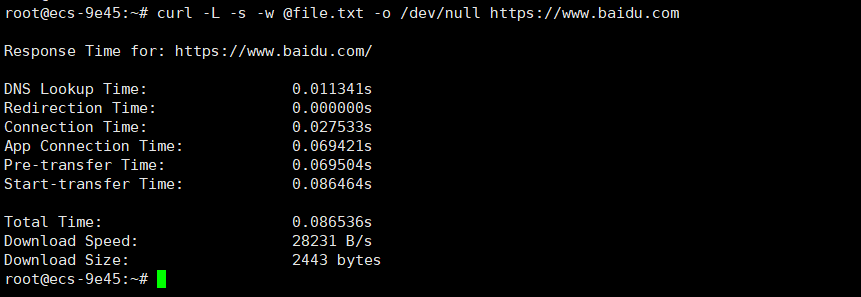
使用curl命令获取接口的耗时
温馨提醒
创建格式化文件
vim file.txt
| |
参数含义:
- url_effective:执行完地址重定向之后的最终 URL
- time_namelookup:DNS 服务器解析域名的时间,单位秒
- time_redirect:重定向时间,包括到最后一次传输前的几次重定向的DNS解析,连接,预传输,传输时间,单位秒
- time_connect:连接时间,从开始到建立TCP连接完成所用时间,包括前边DNS解析时间,如果需要单纯的得到连接时间,用这个time_connect时间减去前边time_namelookup时间
- time_appconnect:连接建立完成时间,如SSL/SSH等建立连接或者完成三次握手时间
- time_pretransfer:从开始到准备传输的时间
- time_starttransfer:开始传输时间。在client发出请求之后,Web 服务器返回数据的第一个字节所用的时间
- time_total:总时间,按秒计。精确到小数点后三位
- speed_download:下载速度,单位字节/每秒
- size_download:下载大小,单位字节
执行curl -L -s -w @file.txt -o /dev/null https://www.baidu.com