Consul集群部署
温馨提醒
集群环境
| 节点IP | 节点名称 |
|---|---|
| 192.168.1.181 | consul-01 |
| 192.168.1.182 | consul-02 |
| 192.168.1.183 | consul-03 |
配置
节点一配置
创建目录
1mkdir -p /data/consul/{data,conf,bin,logs}下载、解压安装包
下载consul压缩包,解压到/data/consul/bin/目录下
创建配置文件
vim /data/consul/conf/consul-01.json1 2 3 4 5 6 7 8 9 10 11 12 13 14 15 16 17 18 19 20 21 22 23 24 25 26 27 28 29 30 31 32 33 34 35 36 37 38{ "datacenter": "dc1", "primary_datacenter": "dc1", "bootstrap_expect": 3, "start_join":[ "192.168.1.181", "192.168.1.182", "192.168.1.183" ], "retry_join":[ "192.168.1.181", "192.168.1.182", "192.168.1.183" ], "advertise_addr": "192.168.1.181", "bind_addr": "192.168.1.181", "client_addr": "0.0.0.0" "server": true, "ui": true, "connect":{ "enabled": true }, "node_name": "consul-01", "data_dir": "/data/consul/data/", "enable_script_checks": false, "enable_local_script_checks": false, "log_file": "/data/consul/logs/", "log_level": "info", "log_rotate_bytes": 100000000, "log_rotate_duration": "24h", "encrypt": "Nliwp+3S19aCAY8Sq7G5NJUqVkBwqNyG13v1BExCMd4=", # consul keygen 生成 "acl": { "enabled": true, "default_policy": "deny", # 默认allow,如果需要自定义权限,将其设置为deny "enable_token_persistence": true, # 开启token持久化,持久化到磁盘上 "enable_key_list_policy":true # 允许KV的递归操作 } }创建启动脚本
vim /usr/lib/systemd/system/consul.service1 2 3 4 5 6 7 8 9 10 11 12 13 14 15 16 17 18 19[Unit] Description="HashiCorp Consul - A service mesh solution" Documentation=https://www.consul.io/ Requires=network-online.target After=network-online.target [Service] Type=notify User=root ExecStart=/data/consul/bin/consul agent -config-dir=/data/consul/conf/ ExecReload=/bin/kill --signal HUP $MAINPID KillMode=process KillSignal=SIGTERM Restart=on-failure LimitNOFILE=10240 LimitNPROC=10240 [Install] WantedBy=multi-user.target启动服务
节点二配置
创建目录
1mkdir -p /data/consul/{data,conf,bin,logs}下载、解压安装包
下载consul压缩包,解压到/data/consul/bin/目录下
创建配置文件
vim /data/consul/conf/consul-02.json1 2 3 4 5 6 7 8 9 10 11 12 13 14 15 16 17 18 19 20 21 22 23 24 25 26 27 28 29 30 31 32 33 34 35 36 37 38{ "datacenter": "dc1", "primary_datacenter": "dc1", "bootstrap_expect": 3, "start_join":[ "192.168.1.181", "192.168.1.182", "192.168.1.183" ], "retry_join":[ "192.168.1.181", "192.168.1.182", "192.168.1.183" ], "advertise_addr": "192.168.1.182", "bind_addr": "192.168.1.182", "client_addr": "0.0.0.0", "server": true, "ui": true, "connect":{ "enabled": true }, "node_name": "consul-02", "data_dir": "/data/consul/data/", "enable_script_checks": false, "enable_local_script_checks": false, "log_file": "/data/consul/logs/", "log_level": "info", "log_rotate_bytes": 100000000, "log_rotate_duration": "24h", "encrypt": "Nliwp+3S19aCAY8Sq7G5NJUqVkBwqNyG13v1BExCMd4=", "acl": { "enabled": true, "default_policy": "deny", "enable_token_persistence": true, "enable_key_list_policy":true } }创建启动脚本
vim /usr/lib/systemd/system/consul.service1 2 3 4 5 6 7 8 9 10 11 12 13 14 15 16 17 18 19[Unit] Description="HashiCorp Consul - A service mesh solution" Documentation=https://www.consul.io/ Requires=network-online.target After=network-online.target [Service] Type=notify User=root ExecStart=/data/consul/bin/consul agent -config-dir=/data/consul/conf/ ExecReload=/bin/kill --signal HUP $MAINPID KillMode=process KillSignal=SIGTERM Restart=on-failure LimitNOFILE=10240 LimitNPROC=10240 [Install] WantedBy=multi-user.target启动服务
节点三配置
创建目录
1mkdir -p /data/consul/{data,conf,bin,logs}下载、解压安装包
下载consul压缩包,解压到/data/consul/bin/目录下
创建配置文件
vim /data/consul/conf/consul-03.json1 2 3 4 5 6 7 8 9 10 11 12 13 14 15 16 17 18 19 20 21 22 23 24 25 26 27 28 29 30 31 32 33 34 35 36 37 38{ "datacenter": "dc1", "primary_datacenter": "dc1", "bootstrap_expect": 3, "start_join":[ "192.168.1.181", "192.168.1.182", "192.168.1.183" ], "retry_join":[ "192.168.1.181", "192.168.1.182", "192.168.1.183" ], "advertise_addr": "192.168.1.183", "bind_addr": "192.168.1.183", "client_addr": "0.0.0.0", "server": true, "ui": true, "connect":{ "enabled": true }, "node_name": "consul-03", "data_dir": "/data/consul/data/", "enable_script_checks": false, "enable_local_script_checks": false, "log_file": "/data/consul/logs/", "log_level": "info", "log_rotate_bytes": 100000000, "log_rotate_duration": "24h", "encrypt": "Nliwp+3S19aCAY8Sq7G5NJUqVkBwqNyG13v1BExCMd4=", "acl": { "enabled": true, "default_policy": "deny", "enable_token_persistence": true, "enable_key_list_policy":true } }创建启动脚本
vim /usr/lib/systemd/system/consul.service1 2 3 4 5 6 7 8 9 10 11 12 13 14 15 16 17 18 19[Unit] Description="HashiCorp Consul - A service mesh solution" Documentation=https://www.consul.io/ Requires=network-online.target After=network-online.target [Service] Type=notify User=root ExecStart=/data/consul/bin/consul agent -config-dir=/data/consul/conf/ ExecReload=/bin/kill --signal HUP $MAINPID KillMode=process KillSignal=SIGTERM Restart=on-failure LimitNOFILE=10240 LimitNPROC=10240 [Install] WantedBy=multi-user.target启动服务
启用 ACL 访问控制
重新启动 consul,在任意一个节点上初始化 consul acl
| |
修改三个节点的配置文件,启动 ACL
配置规则
浏览器访问 http://ip:8500,输入上面生成的SecretID
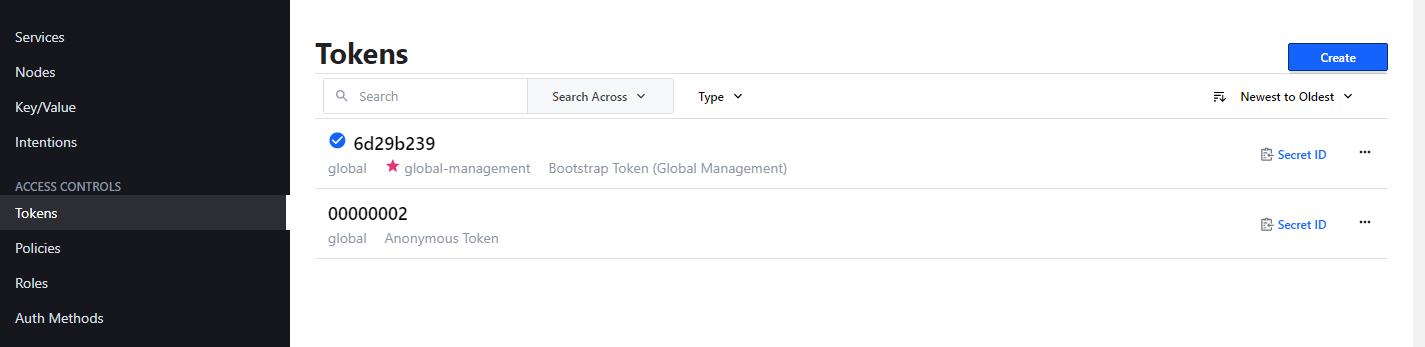
默认Policy:global-management,这个是拥有最高权限的SecretID,等于超级管理员
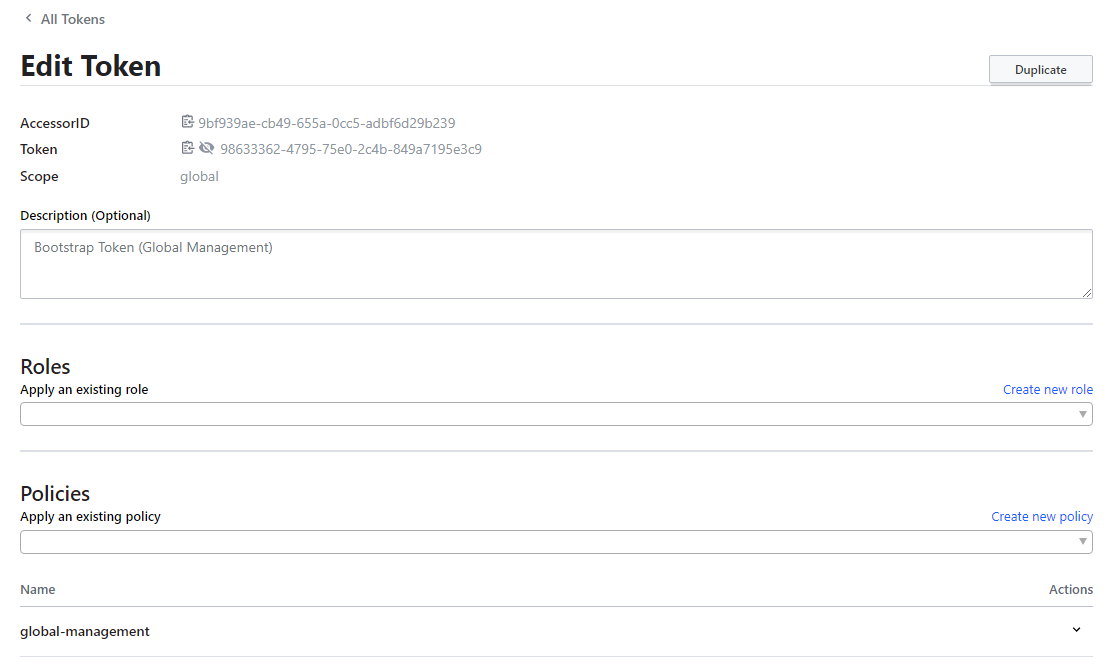
AccessorID:访问ID。唯一,对应有一个token
Scope:作用范围
Roles & Policies:拥有权限或者策略,AccessorID通过关联不同角色和策略来控制访问权限
| |