docker-compose 部署夜莺监控
环境
主机
OS 服务端 客户端 Ubuntu 24 192.168.1.10 192.168.1.11 服务务
服务 说明 Nightingale 服务端(展示数据) Categraf 客户端(采集数据) MySQL DB 存储 Redis DB 缓存 VictoriaMetrics 时序数据库
安装好 docker 和 docker-compose
下载解压安装包
修改配置
配置 Nightingale
cd /data/docker/n9e/docker/compose-bridge/ && vim etc-nightingale/config.toml1 2 3 4 5 6 7 8 9 10 11 12 13 14 15 16 17 18 19 20 21 22 23 24 25 26 27 28 29 30[DB] # postgres: DSN="host=127.0.0.1 port=5432 user=root dbname=n9e_v6 password=1234 sslmode=disable" #DSN="root:1234@tcp(mysql:3306)/n9e_v6?charset=utf8mb4&parseTime=True&loc=Local&allowNativePasswords=true" DSN = "/app/data/n9e.db" # 数据库文件路径 # enable debug mode or not Debug = false # mysql postgres DBType = "sqlite" # 使用 sqlite 数据库 # unit: s MaxLifetime = 7200 # max open connections MaxOpenConns = 150 # max idle connections MaxIdleConns = 50 [Redis] # address, ip:port or ip1:port,ip2:port for cluster and sentinel(SentinelAddrs) Address = "127.0.0.1:6379" # # Username = "" # Password = "123456" # DB = 0 # UseTLS = false # TLSMinVersion = "1.2" # standalone cluster sentinel RedisType = "miniredis" # 使用 Nightingale 内置轻量级redis替代品,适合单机/测试,重启 Nightingale 容器数据丢失 # RedisType = "miniredis" # Mastername for sentinel type # MasterName = "mymaster" # SentinelUsername = "" # SentinelPassword = ""
配置 victoriametrics
cd /data/docker/n9e/docker/compose-bridge/ && vim etc-victoriametrics/prometheus.yml1 2 3 4 5 6 7 8 9 10 11 12 13 14 15 16 17 18 19 20 21 22 23 24 25 26global: scrape_interval: 15s # Set the scrape interval to every 15 seconds. Default is every 1 minute. scrape_configs: - job_name: 'ssl_check' scrape_interval: 40s metrics_path: /probe params: module: [http_2xx,http_3xx,http_4xx] static_configs: - targets: - https://www.baidu.com relabel_configs: - source_labels: [__address__] target_label: __param_target - source_labels: [__param_target] target_label: instance - target_label: __address__ replacement: 192.168.1.10:9115 - job_name: 'windows_exporter' static_configs: - targets: - 192.168.1.12:9182 labels: instance: windows-1-12-prod-beijing-aliyun:9182配置 categraf
vim /data/docker/n9e/docker/compose-bridge/ && vim etc-categraf/config.toml配置 docker-compose.yml
vim /data/docker/n9e/docker/compose-bridge/docker-compose.yml1 2 3 4 5 6 7 8 9 10 11 12 13 14 15 16 17 18 19 20 21 22 23 24 25 26 27 28 29 30 31 32 33 34 35 36 37 38 39 40 41 42 43 44 45 46 47 48 49 50 51 52 53 54 55 56 57 58 59 60 61 62 63 64networks: nightingale: driver: bridge services: victoriametrics: image: victoriametrics/victoria-metrics:v1.79.12 container_name: victoriametrics hostname: victoriametrics restart: always environment: TZ: Asia/Shanghai ports: - "8428:8428" networks: - nightingale volumes: - ./etc-victoriametrics:/opt - ./etc-victoriametrics/data:/victoria-metrics-data command: - "--loggerTimezone=Asia/Shanghai" - "-promscrape.config=/opt/prometheus.yml" - "-retentionPeriod=90d" nightingale: image: flashcatcloud/nightingale:latest container_name: nightingale hostname: nightingale restart: always environment: GIN_MODE: release TZ: Asia/Shanghai volumes: - ./etc-nightingale:/app/etc - ./data:/app/data networks: - nightingale ports: - "17000:17000" - "20090:20090" depends_on: - victoriametrics command: - /app/n9e categraf: image: "flashcatcloud/categraf:latest" container_name: "categraf" hostname: "categraf01" restart: always environment: TZ: Asia/Shanghai HOST_PROC: /hostfs/proc HOST_SYS: /hostfs/sys HOST_MOUNT_PREFIX: /hostfs WAIT_HOSTS: nightingale:17000, nightingale:20090 volumes: - ./etc-categraf:/etc/categraf/conf - /:/hostfs - /var/run/docker.sock:/var/run/docker.sock networks: - nightingale depends_on: - nightingale启动
1docker compose up -d
部署配置 blackbox
下载安装包,把 blackbox_exporter 复制到 /usr/local/bin/ 目录下
配置
vim /etc/blackbox/blackbox.yml1 2 3 4 5 6 7 8 9 10 11 12 13 14 15 16 17 18 19 20 21 22 23 24 25 26 27 28 29 30 31 32 33 34 35 36 37modules: http_2xx: prober: http http: preferred_ip_protocol: "ip4" # no_follow_redirects: true http_post_2xx: prober: http http: method: POST preferred_ip_protocol: "ipv4" tcp_connect: prober: tcp pop3s_banner: prober: tcp tcp: query_response: - expect: "^+OK" tls: true tls_config: insecure_skip_verify: false ssh_banner: prober: tcp tcp: query_response: - expect: "^SSH-2.0-" irc_banner: prober: tcp tcp: query_response: - send: "NICK prober" - send: "USER prober prober prober :prober" - expect: "PING :([^ ]+)" send: "PONG ${1}" - expect: "^:[^ ]+ 001" icmp: prober: icmp创建启动脚本
vim /usr/lib/systemd/system/blackbox.service1 2 3 4 5 6 7 8 9 10 11 12 13 14 15[Unit] Description=Prometheus Blackbox Exporter After=network.target [Service] Type=simple User=root Group=root ExecStart=/usr/local/bin/blackbox_exporter \ --config.file=/etc/blackbox/blackbox.yml \ --web.listen-address=0.0.0.0:9115 Restart=on-failure [Install] WantedBy=multi-user.target启动 blackbox
客户端部署 categraf
下载解压 categraf
修改 categraf 配置
vim /opt/categraf-v0.4.36-linux-amd64/conf/config.toml创建启动脚本
vim /usr/lib/systemd/system/categraf.service1 2 3 4 5 6 7 8 9 10 11 12 13 14 15 16 17 18 19 20[Unit] Description="Categraf" After=network.target [Service] Type=simple ExecStart=/opt/categraf-v0.4.36-linux-amd64/categraf WorkingDirectory=/opt/categraf-v0.4.36-linux-amd64 Restart=on-failure SuccessExitStatus=0 LimitNOFILE=65536 StandardOutput=syslog StandardError=syslog SyslogIdentifier=categraf [Install] WantedBy=multi-user.target启动 categraf
修改 categraf docker 监控配置
vim /opt/categraf-v0.4.36-linux-amd64/conf/input.docker/docker.toml1 2 3 4 5 6 7 8 9 10 11 12 13[[instances]] endpoint = "unix:///var/run/docker.sock" gather_services = false gather_extend_memstats = false container_id_label_enable = true container_id_label_short_style = true container_name_include = [] container_name_exclude = [] timeout = "5s" perdevice_include = [] total_include = ["cpu", "blkio", "network"] docker_label_include = [] docker_label_exclude = ["annotation*", "io.kubernetes*", "*description*", "*maintainer*", "*hash", "*author*", "*org_*", "*date*", "*url*", "*docker_compose*"]修改 categraf mysql 监控配置
vim /opt/categraf-v0.4.36-linux-amd64/conf/input.mysql/mysql.toml1 2 3 4 5 6 7 8 9 10[[instances]] address = "127.0.0.1:3306" # 数据库地址和端口 username = "exporter" # 用户名 password = "exporter" # 密码 extra_status_metrics = true extra_innodb_metrics = true gather_processlist_processes_by_state = true gather_processlist_processes_by_user = true gather_slave_status = true labels = { instance="3306-Master-192.168.1.11" } # instance 名称修改 categraf 监控 elasticsearch 配置
vim /opt/categraf-v0.4.36-linux-amd64/conf/input.elasticsearch/elasticsearch.toml
登录 n9e
用户名:root
密码:root.2020
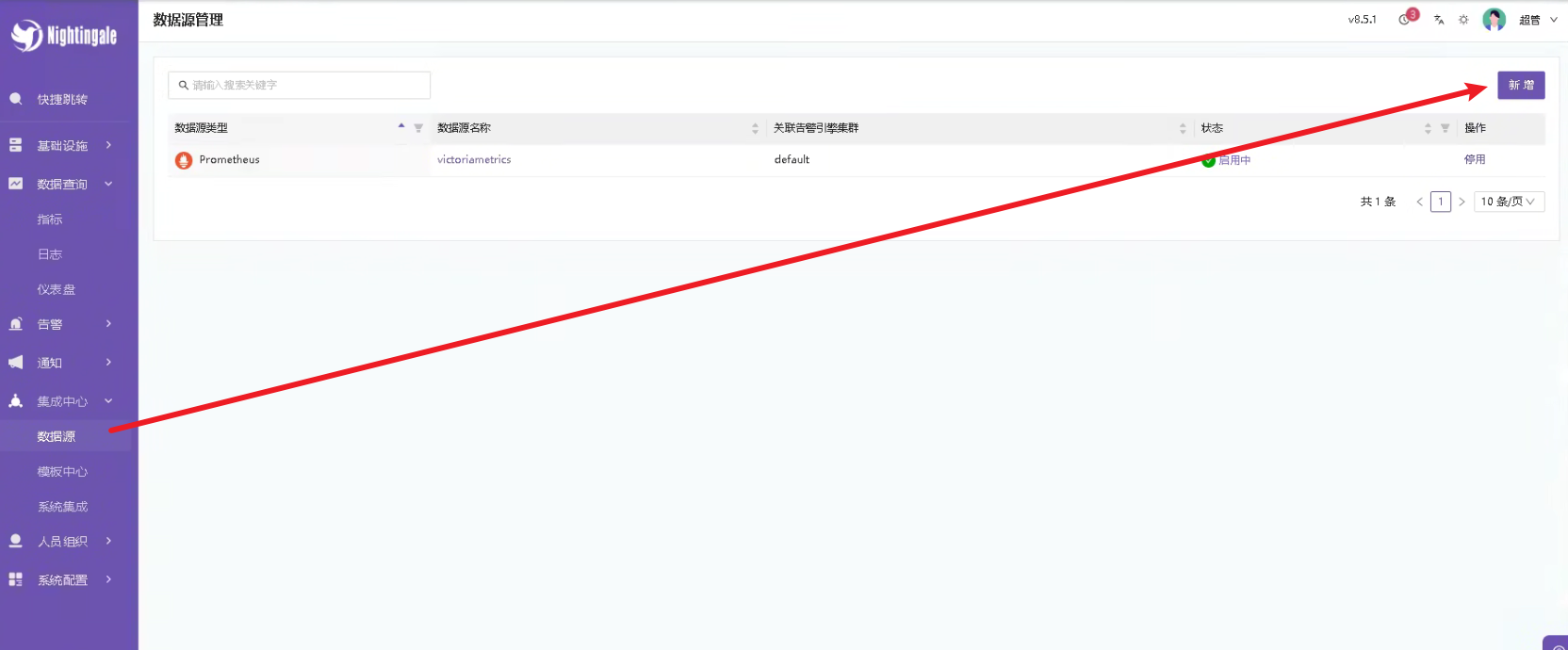
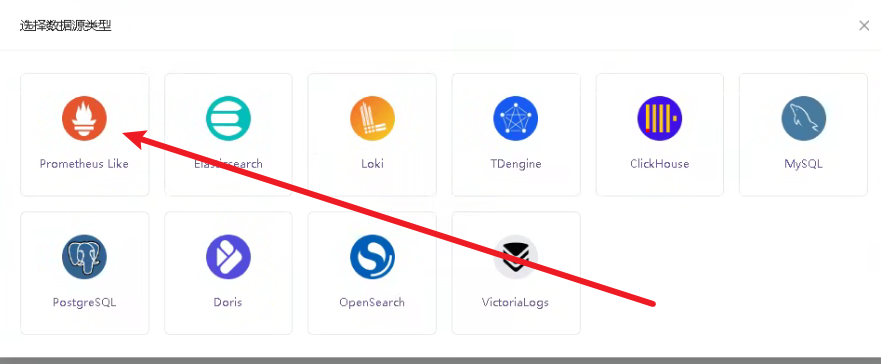
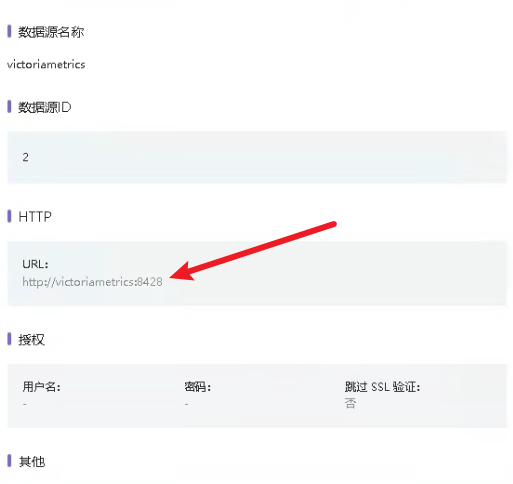
配置数据源

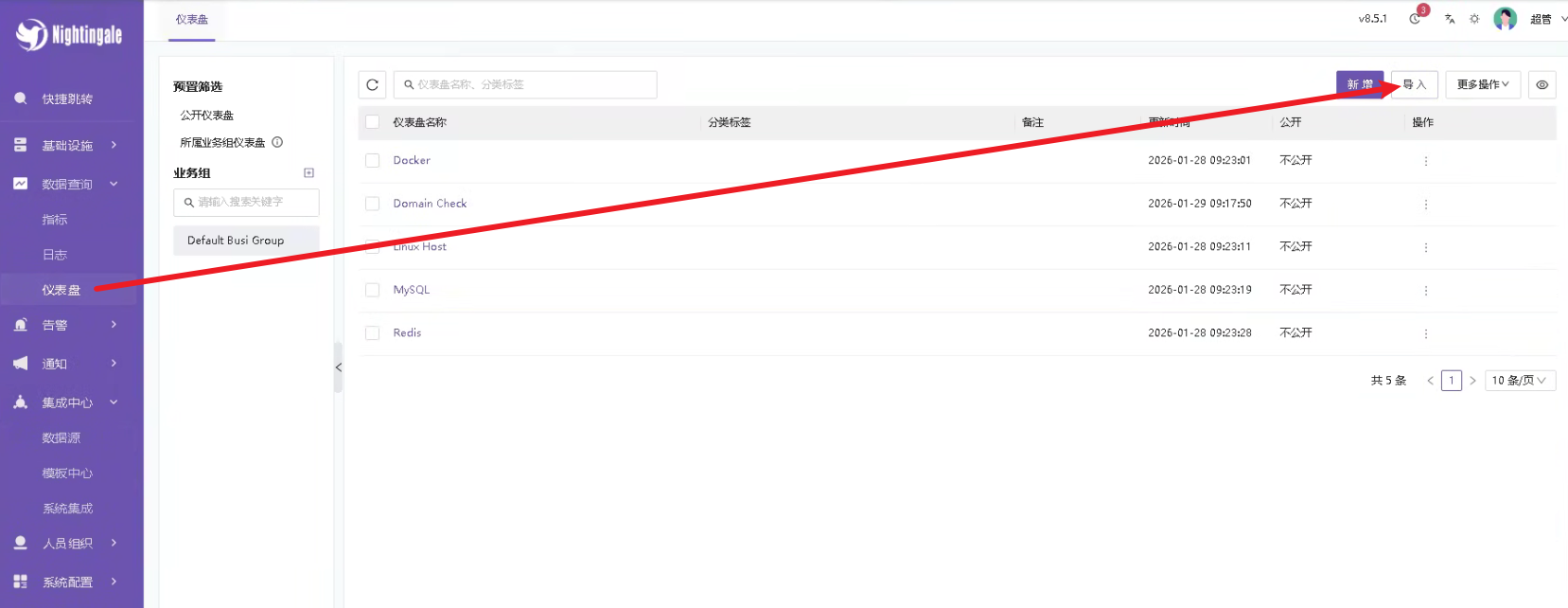
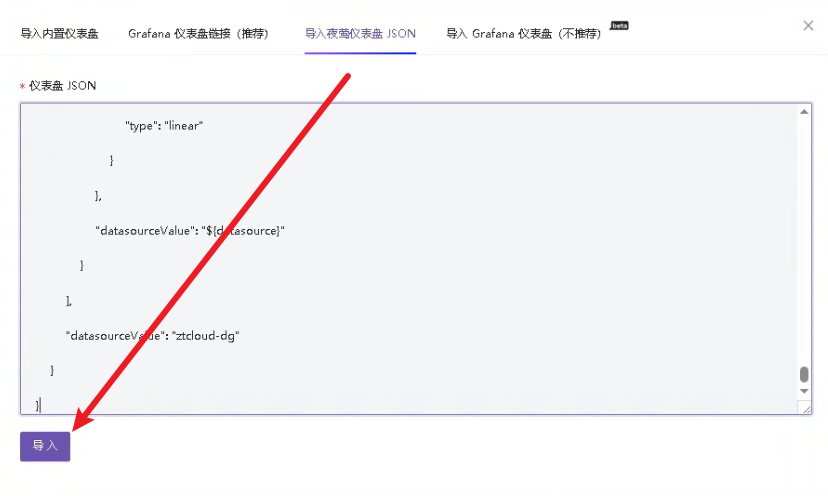
导入仪表盘
Consul 仪表盘, 点击下载
Docker 仪表盘, 点击下载
Doris 仪表盘, 点击下载
ElasticSearch 仪表盘, 点击下载
GPU 仪表盘, 点击下载
JMX 仪表盘, 点击下载
Kafka 仪表盘, 点击下载
LinuxHost 仪表盘, 点击下载
Milvus 仪表盘, 点击下载
Qdrant 仪表盘, 点击下载
MongoDB 仪表盘, 点击下载
Nginx 仪表盘, 点击下载
Pulsar 仪表盘, 点击下载 点击下载 点击下载 点击下载 点击下载 点击下载 点击下载
Zookeeper 仪表盘, 点击下载
SSL 仪表盘, 点击下载
Windows 仪表盘, 点击下载