Nginx+Fancyindex 实现索引目录

温馨提醒

简介

Fancy Index 模块可以生成文件列表,就像内置的 audoindex 模块一样,但增加了一些样式。

下载安装包

  • 下载 Fancy Index

    1
    2
    
    cd /usr/local/src/
    git clone https://github.com/aperezdc/ngx-fancyindex.git
  • 下载 Nginx-Fancyindex-Theme

    1
    2
    
    cd /usr/local/src/
    git clone https://github.com/alehaa/nginx-fancyindex-flat-theme.git
  • 下载 Nginx

    1
    2
    3
    
    cd /usr/local/src/
    wget https://nginx.org/download/nginx-1.26.3.tar.gz
    tar xf nginx-1.26.3.tar.gz

安装 Nginx

  • 安装 Nginx

    1
    2
    3
    4
    5
    6
    7
    8
    9
    
    # 创建 nginx 用户
    useradd -s /sbin/nologin nginx
    
    # 配置
    cd nginx-1.26.3
    ./configure --prefix=/usr/local/nginx --user=nginx --group=nginx --with-http_ssl_module --with-http_stub_status_module --with-stream --with-pcre --with-http_gzip_static_module --with-http_realip_module --add-module=/usr/local/ngx-fancyindex
    
    # 编译安装
    make && make install

    配置 Nginx

    vim /usr/local/nginx/conf/nginx.conf

     1
     2
     3
     4
     5
     6
     7
     8
     9
    10
    11
    12
    13
    14
    15
    16
    17
    18
    19
    20
    21
    22
    23
    24
    25
    
    #
    user nginx;
    worker_processes  auto;
    pid        logs/nginx.pid;
    
    events {
        worker_connections  1024;
    }
    
    http {
        include       mime.types;
        default_type  application/octet-stream;
    
        log_format  main  '$remote_addr - $remote_user [$time_local] "$request" '
                          '$status $body_bytes_sent "$http_referer" '
                          '"$http_user_agent" "$http_x_forwarded_for"';
    
        sendfile        on;
        tcp_nopush     on;
    
        keepalive_timeout  65;
    
        gzip  on;
        include vhost/*.conf;
    }

    创建索引配置文件

     1
     2
     3
     4
     5
     6
     7
     8
     9
    10
    11
    12
    13
    14
    15
    16
    17
    18
    19
    20
    21
    22
    23
    24
    25
    26
    27
    28
    29
    30
    
    vim /usr/local/nginx/conf/vhost/fancyindex.conf
    
    server {
        listen      80;
        server_name 172.20.10.150;
    
        location / {
            root /usr/local/nginx/html;
    
            # 使用 fancyindex
            fancyindex on;
    
            # 不显示精确大小
            fancyindex_exact_size off;
    
            # 文件日期
            fancyindex_time_format "%Y-%m-%d %H:%M";
    
            # 使用用户本地时间
            fancyindex_localtime on;
    
            fancyindex_header "/theme/header.html";
            fancyindex_footer "/theme/footer.html";
        }
    
        location /theme/ {
            alias /usr/local/nginx/theme/;
        }
    
    }

    拷贝主题

    1
    2
    
    mkdir /usr/local/nginx/theme
    cp -r /usr/local/src/nginx-fancyindex-flat-theme/layout/* /usr/local/nginx/theme/

    启动nginx

    1
    2
    
    /usr/local/nginx/sbin/nginx -t
    /usr/local/nginx/sbin/nginx

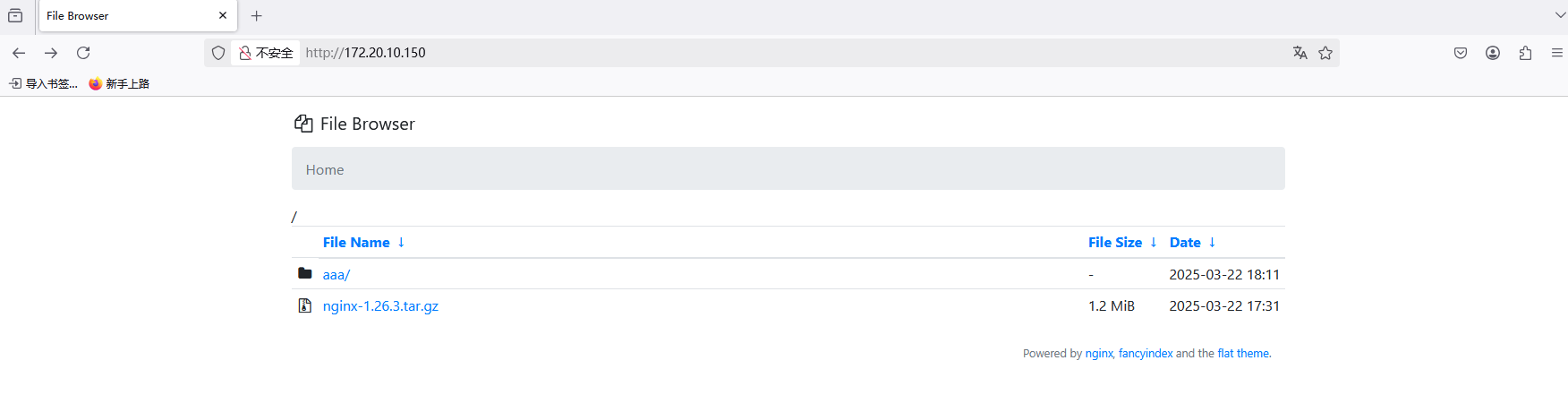
    访问nginx,页面还没有进行美化

    image-20250322182103535

fancyindex 其他功能

 1
 2
 3
 4
 5
 6
 7
 8
 9
10
11
12
13
fancyindex_default_sort name;  # 排序规则,默认name,可选项name、size、date、name_desc、size_des、date_desc
fancyindex_directories_first on; # 是否将目录分组在一起并在所有常规文件之前对它们进行排序,默认启用
fancyindex_css_href "";  # 插入指向CSS样式表的链接
fancyindex_exact_size off;  # 显示精确字节大小还是显示友好可读的大小
fancyindex_name_length 500;  # 定义最大文件名长度限制(以字节为单位)
fancyindex_footer "";  # 定义在目录列表的底部插入哪个文件
fancyindex_header "";  # 定义在目录列表的顶部插入哪个文件
fancyindex_show_path on;  # 在标题之后是否输出路径和结束</ h1>标记,默认启用
fancyindex_show_dotfiles on;  # 是否列出以点开头的文件,默认关闭
fancyindex_ignore "";  # 指定不显示的文件名列表
fancyindex_hide_symlinks off;  # 是否隐藏符号链接,默认关闭
fancyindex_hide_parent_dir on;  # 是否隐藏父目录,默认关闭
fancyindex_localtime on;  # 时间显示为本地时间,默认关闭,显示为格林尼治标准时间